ラベル Emacs の投稿を表示しています。 すべての投稿を表示

2019-06-16

Emacs 27.0.50 を macOS 10.15 Catalina でコンパイルした

macOS 11.15 Catalina beta 1 へアップデートしたら、むかし入れた Emacs が動かなくなったので、改めてソースから最新版をコンパイルした。

Homebrew の設定とかは 11.14 Mojave 時代にやっていたので、そのまま使った。過去のコパンイル記事はこちら。

ソースコードの取得

Emacs の開発版を git 経由で取得する:

$ git clone git://git.savannah.gnu.org/emacs.git emacs-2019

コンパイル

git で取得したソースには configure スクリプトがないので、autogen コマンドで作成。

$ cd emacs
$ ./autogen.sh

デフォルトだと xml2 ライブラリーのパスを解決できないので、CFLAGS でパスを指定。あと、mailutils がどうのと言われて configure が最後まで実行されないので、mailutils をインストールして指定しておく。

$ brew install mailutils
$ CFLAGS=`xml2-config --cflags` ./configure --without-xim --with-mailutils

Configured for 'x86_64-apple-darwin19.0.0'.

  Where should the build process find the source code?    .
  What compiler should emacs be built with?               gcc -I/Library/Developer/CommandLineTools/SDKs/MacOSX10.15.sdk/usr/include/libxml2
  Should Emacs use the GNU version of malloc?             no
    (The GNU allocators don't work with this system configuration.)
  Should Emacs use a relocating allocator for buffers?    no
  Should Emacs use mmap(2) for buffer allocation?         no
  What window system should Emacs use?                    nextstep
  What toolkit should Emacs use?                          none
  Where do we find X Windows header files?                NONE
  Where do we find X Windows libraries?                   NONE
  Does Emacs use -lXaw3d?                                 no
  Does Emacs use -lXpm?                                   no
  Does Emacs use -ljpeg?                                  no
  Does Emacs use -ltiff?                                  no
  Does Emacs use a gif library?                           no 
  Does Emacs use a png library?                           no 
  Does Emacs use -lrsvg-2?                                no
  Does Emacs use cairo?                                   no
  Does Emacs use -llcms2?                                 no
  Does Emacs use imagemagick?                             no
  Does Emacs support sound?                               no
  Does Emacs use -lgpm?                                   no
  Does Emacs use -ldbus?                                  yes
  Does Emacs use -lgconf?                                 no
  Does Emacs use GSettings?                               no
  Does Emacs use a file notification library?             yes (kqueue)
  Does Emacs use access control lists?                    yes 
  Does Emacs use -lselinux?                               no
  Does Emacs use -lgnutls?                                yes
  Does Emacs use -lxml2?                                  yes
  Does Emacs use -lfreetype?                              no
  Does Emacs use HarfBuzz?                                no
  Does Emacs use -lm17n-flt?                              no
  Does Emacs use -lotf?                                   no
  Does Emacs use -lxft?                                   no
  Does Emacs use -lsystemd?                               no
  Does Emacs use -ljansson?                               no
  Does Emacs use -lgmp?                                   yes
  Does Emacs directly use zlib?                           yes
  Does Emacs have dynamic modules support?                no
  Does Emacs use toolkit scroll bars?                     yes
  Does Emacs support Xwidgets (requires gtk3)?            no
  Does Emacs have threading support in lisp?              yes
  Does Emacs support the portable dumper?                 yes
  Does Emacs support legacy unexec dumping?               no
  Which dumping strategy does Emacs use?                  pdumper


Run 'make' to build Emacs, then run 'src/emacs' to test it.
Run 'make install' in order to build an application bundle.
The application will go to nextstep/Emacs.app and can be run or moved
from there.
The application will be fully self-contained.

色々なライブラリーが no になってしまっているけど、まずは動かすことを第一目標に気にしない。時間が出来た時に、改めて設定を見直してみよう。

make install でコンパイル。./nextstep ディレクトリー下に Emacs が出来上がる。

$ make install

ぼくは .bashrc に次の一行を書いて、ターミナルから emacs コマンドを叩けるようにしている。

# Emacs
alias emacs='open ~/project/emacs/nextstep/Emacs.app/'

ただ、ターミナルを起動した時に .bashrc を読み込んでくれない。Catalina からデフォルト・シェルが zsh に変更になったと聞くけど、その影響かな? でも起動している shell は bash のようなんだけど。これも、時間が出来た時に調べてみよう。

2017-07-13

AutoComplete で C-n, C-p を補完選択に使う

Emacs で auto-complete パッケージで。補完の選択に C-n, C-p を使いたい。.emacs.el に次のコードを追加する:

(ac-config-default)
(add-hook 'auto-complete-mode-hook
          (lambda ()
            (define-key ac-completing-map "\C-n" 'ac-next)
            (define-key ac-completing-map "\C-p" 'ac-previous)))

これだけ。

今まで矢印キーでしか補完の選択候補を選べなかったのが、C-n, C-p でできるようになった。便利。

ref

このやり方は ryfjwr 氏の gist で知った。

2017-05-15

chatwork.el 0.3 for ChatWork API v2

2017-05-11、ChatWork の Emacs 用フロントエンド chatwork.el のバージョン 0.3 をリリースした。

バージョン 0.3 での変更は、ChatWork API のバージョン変更。2017-05-15 をもって、ChatWork API の v1 が廃止され v2 へと移行される。移行期間ギリギリで、その対応を行なった。

chatwork.el は MELPA からインストールできるので、興味があったら是非お試しあれ。

2017-04-25

Emacs 25.2 リリース

2017-04-21、info-gnu-emacs ML で、Emacs 25.2 のリリースがアナウンスされた。今回はバグ・フィクス・リリースとされる。

最終 Release Candidate は 2 だった。

  • RC1: 2017-02-03
  • RC2: 2017-02-21
  • 正式版: 2017-04-21

info-gnu-emacs では最初 25.2 を 25.1 としてアナウンスしていて、3 分後にタイトルが間違っていたと追加のアナウンスがあった。

ref

2017-03-16

Emacs-Lisp 関数 skip-chars-forward で文字スキップ

Emacs で空白・改行をスキップしてカーソルを動かしたいと思った。正規表現を使って re-search-forward を使う方法もあるけど、そこまで検索とかしたいわけじゃない。もう少し軽めの関数で十分。というわけで、skip-chars-forward を使った。

関数の説明は次の通り:

Move point forward, stopping before a char not in STRING, or at pos LIM. STRING is like the inside of a ‘[...]’ in a regular expression except that ‘]’ is never special and ‘\’ quotes ‘^’, ‘-’ or ‘\’ (but not at the end of a range; quoting is never needed there). Thus, with arg "a-zA-Z", this skips letters stopping before first nonletter. With arg "^a-zA-Z", skips nonletters stopping before first letter. Char classes, e.g. ‘[:alpha:]’, are supported.

Returns the distance traveled, either zero or positive.

引数にはスキップした文字を渡す。複数の文字をスキップしたい場合は、正規表現 [...] の中の文字列 (... の部分) だけを渡す。

例えば a, b, c の 3 つの文字をスキップしたい場合は次のように書く。

(skip-chars-forward "abc")

- (ハイフン) を使うこともできる。

(skip-chars-forward "a-c")

a, b, c 以外の文字をスキップしたい場合は、否定として ^ が使える:

(skip-chars-forward "^abc")

POSIX の文字クラスも利用可能。今回は空白・改行をスキップしたい。空白・改行を現す文字クラスは [:space:]。これを使ってみる:

(skip-chars-forward "[:space:]")

すると改行はスキップされなかった。

アレ? なんでかな。

とりあえず、次のようなコードを書いたけど気持ち悪い:

(skip-chars-forward "[:space:]\n\r")

誰か理由を知ってる人がいたら、コメントください。

2017-02-28

Emacs 25.2 rc2 リリース

Irreal ブログで、Emacs 25.2 rc2 が出たことを知った。

info-gnu-emacs でのアナウンスは 2017-02-21。ちなみに Emacs 25.2 rc1 のアナウンスは 2017-02-03 に出ていた。

Emacs 25.2 の正式リリースまで、もう少しかな。

ref

2017-02-08

現在の Emacs のバージョンを調べる方法

Emacs のバージョンを調べる方法について。

一般には変数 emacs-version を参照すれば良い。

emacs-version
"26.0.50.1"

けれども、ぼくのように開発版の Emacs を使っている場合はこの情報だけじゃ不十分。バグを見つけたとしても、数コミット先では修正されているかもしれない。

そんなケースでは Git のハッシュ値を見る。Emacs も Git でバージョン管理するようになったから (数年前まで CVS だったのが信じられない!)

嬉しいことに、コンパイル時の Emacs のハッシュ値を調べる関数がある。

(emacs-repository-get-version)
"308d5962236448a84795f49d775601599688d78d"

すごい!!

ref

emacs-repository-get-version については下記記事で知った。感謝。

2017-01-29

Emacs で HTML のライブ・プレビューを行なう impatient-mode

Emacs で編集中の HTML ソースを外部ブラウザー (Chrome とか) でライブ・プレビューするマイナー・モード impatient-mode の存在を知ったので試してみた。

インストール

MELPA からインストールできる。.emacs に MELPA の設定をして:

;;
;; Package (Emacs 24+)
;;
(require 'package)
(add-to-list 'package-archives '("melpa" . "http://melpa.milkbox.net/packages/") t)
(package-initialize)

M-x package-list-packages から impatient-mode を選択しインストールする。

使い方

foo.html というファイルを編集しているとする。

  1. M-x httpd-start でウェブ・サーバーを起動しておく (一度だけ)
  2. foo.html を開く
  3. M-x impatient-mode でマイナー・モード impatient-mode をオンにする
  4. 外部ブラウザーで http://localhost:8080/imp にアクセスする
  5. ファイル名一覧が表示されるので foo.html を選ぶ

以上。

ライブ・プレビューが不要になったら、もう一度 M-x impatient-mode を叩いて impatient-mode をオフにしてやればいい。

動画

あとがき

HTML を書いて、すぐに確認できるのは便利。同じ要領で Markdown のライブ・プレビューもやりたい。今度、探してみよう。

2017-01-12

Flickr の embed コードを XML valid にする EmacsLisp

Flickr で生成した embed コードは XML valid じゃないので、Emacs の nXML モードが文句を言う。邪魔なので、修正する elisp を書いた。

(while (search-forward "data-flickr-embed" nil t)
  (beginning-of-line)
  (when (search-forward "></a>" nil t)
    (replace-match "/></a>"))
  (when (search-forward "async" nil t)
    (replace-match "async=\"async\""))
  (forward-line 1))

ブログ書き用のコードなんだけど、こういうのをまとめて自分用 Blog モードを作ろうかなぁ。。。

2017-01-06

Emacs 26.1 で string-to-int 関数がなくなった

開発中の Emacs を入れたところ、string-to-int 関数がなくなっててハマった。

代わりに string-to-number 関数を使えば良さそう。

NEWS にはこう書いてあった:

** Some obsolete functions, variables, and faces have been removed:
*** make-variable-frame-local. Variables cannot be frame-local any more.
*** From subr.el: window-dot, set-window-dot, read-input, show-buffer, eval-current-buffer, string-to-int
*** All the default-FOO variables that hold the default value of the FOO variable. Use 'default-value' and 'setq-default' to access and change FOO, respectively. The exhaustive list of removed variables is: 'default-mode-line-format', 'default-header-line-format', 'default-line-spacing', 'default-abbrev-mode', 'default-ctl-arrow', 'default-truncate-lines', 'default-left-margin', 'default-tab-width', 'default-case-fold-search', 'default-left-margin-width', 'default-right-margin-width', 'default-left-fringe-width', 'default-right-fringe-width', 'default-fringes-outside-margins', 'default-scroll-bar-width', 'default-vertical-scroll-bar', 'default-indicate-empty-lines', 'default-indicate-buffer-boundaries', 'default-fringe-indicator-alist', 'default-fringe-cursor-alist', 'default-scroll-up-aggressively', 'default-scroll-down-aggressively', 'default-fill-column', 'default-cursor-type', 'default-cursor-in-non-selected-windows', 'default-buffer-file-coding-system', 'default-major-mode', and 'default-enable-multibyte-characters'.

あとがき

T-Code の中で、string-to-int を使っている。インストールしようとしたら、関数がないよ、と怒られてしまった。後で直しておこう。

2017-01-05

Emacs 25.1 を macOS でコンパイルした

Emacs 25.1 (というか git リポジトリーの HEAD) を macOS 10.12 でコンパイルした。作業記録を残しておく。

emacs-25.1

準備

必要なパッケージを予めインストールしておく。必要なのは autoconf と automake。

$ brew install autoconf automake
$ autoconf --version
autoconf (GNU Autoconf) 2.69
Copyright (C) 2012 Free Software Foundation, Inc.
License GPLv3+/Autoconf: GNU GPL version 3 or later
<http://gnu.org/licenses/gpl.html>, <http://gnu.org/licenses/exceptions.html>
This is free software: you are free to change and redistribute it.
There is NO WARRANTY, to the extent permitted by law.

Written by David J. MacKenzie and Akim Demaille.
$ automake --version
automake (GNU automake) 1.15
Copyright (C) 2014 Free Software Foundation, Inc.
License GPLv2+: GNU GPL version 2 or later <http://gnu.org/licenses/gpl-2.0.html>
This is free software: you are free to change and redistribute it.
There is NO WARRANTY, to the extent permitted by law.

Written by Tom Tromey <tromey@redhat.com>
       and Alexandre Duret-Lutz <adl@gnu.org>.

あと、デフォールトで入っている makeinfo のバージョンが古かったので、新しいものと入れ替えた。

$ brew link --force texinfo
$ makeinfo --version
texi2any (GNU texinfo) 6.3

Copyright (C) 2016 Free Software Foundation, Inc.
License GPLv3+: GNU GPL version 3 or later <http://gnu.org/licenses/gpl.html>
This is free software: you are free to change and redistribute it.
There is NO WARRANTY, to the extent permitted by law.

ソースコードを取得する

Emacs の最新ソースを git 経由で取得する。

$ git clone git://git.savannah.gnu.org/emacs.git

コンパイル

git で取得したソースには configure スクリプトがないので、autogen コマンドで作成。

$ cd emacs
$ ./autogen.sh

configure スクリプトを、適当なオプションを付けて実行。

$ ./configure --without-xim
(snip)
Configured for 'x86_64-apple-darwin16.1.0'.

  Where should the build process find the source code?    .
  What compiler should emacs be built with?               gcc -g3 -O2
  Should Emacs use the GNU version of malloc?             no
    (The GNU allocators don't work with this system configuration.)
  Should Emacs use a relocating allocator for buffers?    no
  Should Emacs use mmap(2) for buffer allocation?         no
  What window system should Emacs use?                    nextstep
  What toolkit should Emacs use?                          none
  Where do we find X Windows header files?                /usr/X11/include
  Where do we find X Windows libraries?                   /usr/X11/lib
  Does Emacs use -lXaw3d?                                 no
  Does Emacs use -lXpm?                                   no
  Does Emacs use -ljpeg?                                  yes
  Does Emacs use -ltiff?                                  no
  Does Emacs use a gif library?                           no 
  Does Emacs use a png library?                           no 
  Does Emacs use -lrsvg-2?                                no
  Does Emacs use cairo?                                   no
  Does Emacs use imagemagick?                             no
  Does Emacs support sound?                               no
  Does Emacs use -lgpm?                                   no
  Does Emacs use -ldbus?                                  yes
  Does Emacs use -lgconf?                                 no
  Does Emacs use GSettings?                               no
  Does Emacs use a file notification library?             yes (kqueue)
  Does Emacs use access control lists?                    yes 
  Does Emacs use -lselinux?                               no
  Does Emacs use -lgnutls?                                yes
  Does Emacs use -lxml2?                                  yes
  Does Emacs use -lfreetype?                              no
  Does Emacs use -lm17n-flt?                              no
  Does Emacs use -lotf?                                   no
  Does Emacs use -lxft?                                   no
  Does Emacs use -lsystemd?                               no
  Does Emacs directly use zlib?                           yes
  Does Emacs have dynamic modules support?                no
  Does Emacs use toolkit scroll bars?                     yes
  Does Emacs support Xwidgets (requires gtk3)?            no
  Does Emacs have threading support in lisp?              yes
(snip)

make install でコンパイル。./nextstep ディレクトリー以下に Emacs が出来上がる。

$ make install

ぼくは .bashrc に次の一行を書いて、ターミナルから emacs コマンドを叩いている。

# Emacs
alias emacs='open ~/project/emacs/nextstep/Emacs.app/'

あとがき

久しぶりに Emacs をソースかマコンパイルした。画像系のライブラリーが configure で no になっていたり、dynamic modules support を yes にしていなかったり。いくつか手直ししたい所も残っている。ヒマを見て、また再コンパイルを試したい。

2017-01-01

Emacs に Auto-Complete を最小構成でインストールしてみた

Emacs の Auto-Complete を使い始めてみた。

Auto-Complete をインストールすると、IntelliJ を初めとする IDE でおなじみの補完候補が表示されるようになる。

インストールと設定

MELPA 経由でインストールした。M-x package-install-pacakges から「auto-complete」パッケージを選択してインストール。

.emacs には次の設定を書いた。

;;
;; auto-complete
;;
(ac-config-default)

これで Auto-Complete モードが使えるようになる。基本、プログラムの編集モードで Auto-Complete が ON になり、それ以外ではユーザーが明示的に ON にしないと Auto-Complete モードには入らないらしい。Auto-Complete モードが ON の時は、モードラインに AC の文字が現れる。

細かい設定とかは、これから見ていくつもり。

2015-11-02

Magit の解説ムービー

Emacs の git フロントエンド magit の解説ムービーが紹介されていた。

英語だけど、英語が分からなくても大丈夫。画面を 2 分割して右画面にどのキーを打ったのか見せてくれる。どのキーを押して、どんな操作が出来るのか分かる。magit 初心者には良い教材になると思う。

stage, commit, stash, fetch そして rebase。初級から中級まで。

ぼくは、このビデオを見て l l でコミット・グラフを magit の中で表示できることを知った!

2015-10-15

Emacs (Mac) でワーキング・ディレクトリーを Finder で開く

Mac の Emacs で作業をしていて、自分の居る場所を Finder アプリで開きたくなることがある。これは実に簡単にできる。

M-! open .

これだけ。

M-! で Emacs から外部コマンドを実行。呼び出すコマンドが open .。open コマンドは引数に応じて Mac の適当なアプリを開いてくれる。引数が「.」。つまりカレント・ディレクトリーなので、ディレクトリーを開くアプリ、つまり Finder アプリが起動するというわけ。

どれだけ深い階層にいても使えるし、パスをコピペする必要もないので便利。

Emacs から sbt test を実行する

Emacs から sbt を使ってテストを走らせたい。コンソールなら sbt test と打つところ。Emacs から sbt を走らせたい。最初に思いついたのは M-x compile コマンド (c-mode などでよく使う) だったけど、もっと sbt に特化したものはないかと思ったらあった。

M-x sbt-command

プロンプトが現れるので、「test」と入力して Return キーを押すと sbt コマンドが実行され、ログが別ウィンドウに表示された。

sbt-command は sbt-mode に含まれている。便利。

2015-08-12

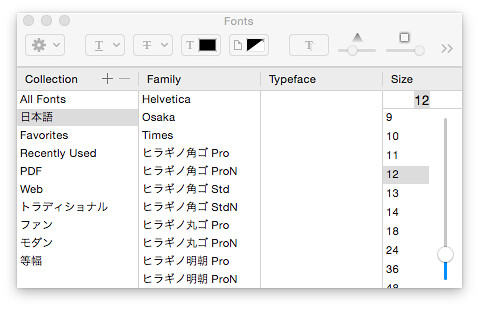
Emacs for Cocoa でフォント設定を変える方法

X Window ベースな Emacs だと Sfift キーを押しながら左クリックするとフォント設定用のウィンドウが現れたけど、Cocoa な Emacs だとその方法が使えなくなっててハマったのでメモ。

Cocoa な Emacs ではメニューから「Options > Set Default Font...」を選ぶ。

もしくは、次のコマンドを実行する。

M-x menu-set-font

すると、フォント設定用のウィンドウが現れる。

Emacs-menu-set-font

2015-08-08

Magit を Melpa からインストールしたら警告が出たので対処した

Emacs のパッケージ管理システムで magit をアップデートしたら、次のような警告が現れた。

Error (magit): git-commit-mode has to be removed

Magit is no longer compatible with the library `git-commit-mode', which was used in earlier releases. Please remove it, so that Magit can use the successor `git-commit' without the obsolete library getting in the way. Then restart Emacs.

Error (magit): git-rebase-mode has to be removed

Magit is no longer compatible with the library `git-rebase-mode', which was used in earlier releases. Please remove it, so that Magit can use the successor `git-rebase' without the obsolete library getting in the way. Then restart Emacs.

コンパイル中に一瞬現れる。確認するには、*Warnings* バッファーを開く。

要点は、最新の Magit では git-commit-mode パッケージと git-rebase-mode パッケージを使わなくなったので削除してね、ということらしい。

対処

パッケージ・システムで対象のパッケージを削除。念のため、magit パッケージも削除。Emacs を再起動して、magit パッケージをインストール。これでおしまい。

  1. パッケージの削除
    1. M-x package-list-package
    2. git-commit-mode パッケージ上で d キーを押して削除マークを付ける
    3. git-rebase-mode パッケージ上で d キーを押して削除マークを付ける
    4. magit パッケージ上で d キーを押して削除マークを付ける
    5. x で削除を実行
  2. Emacs を終了 (C-x C-c)
  3. Emacs を起動
  4. magit パッケージをインストール
    1. M-x package-list-package
    2. magit パッケージ上で i キーを押してインストール・マークを付ける
    3. x でインストールを実行

2015-08-07

Emacs-Lisp の insert は数字を直接出力できない

Emacs-Lisp で次のようなコードを書いたところエラーになった。

(insert 100000000)
wrong-type-argument: char-or-string-p 100000000

数字を出力するには number-to-string で文字列に変える必要がある。

(insert (number-to-string 100000000))
100000000

数字は char

insert に数字を引数として与えると、char の文字コードを渡したのと同じになる。例えば、ASCII コードの文字「a」は文字コードで「97」なので

(insert 97)
a

このようになる。Emacs は ?文字 を評価すると文字コードが分かる。試しに ?安 を評価したら 23433 だった。これを insert してみる。

(insert 23433)

「安」が出力された。想定通り。

あとがき

今回、数字を insert しようとしてエラーになった。これは数字が大きかったから。数字が小さかったら、意図しない「文字」が出力されて、気付かなかったかもしれない。気をつけよ。

2015-02-19

fcopy.el を MELPA に登録した

Emacs 用のコピー・パッケージ fcopyMELPA に登録した。

fcopy とは?

奇妙なコピーという意味で Funny Copy と名付けた。略して fcopy。

普通のコピーは「コピーする対象」を「コピー」してから「貼り付け場所」に移動して「ペースト」を行なう。

fcopy は手順が逆になる。今、カーソルのある場所が「貼り付け場所」。先に「貼り付け場所」が決まってる。この前提で fcopy コマンドを実行 (M-x fcopy) すると、「コピーする対象」を探す・選択するモード (fcopy-mode) に移行する。「コピーする対象」を選んで RET を押すと、「貼り付け場所」(fcopy を始めた場所) に自動的に戻って「ペースト」が実行される。

対話的に「挿入」を行なう、とも言える。interactive-insert とかに名前を変えようかと思ったけど、ぼくの意識は「挿入」よりも「コピー」なので、fcopy という名前を使い続けてる。

fcopy-mode では、いくつかワンストロークのコマンドも用意している:

  • バッファーへの書き込みは禁止され、誤編集ができなくなる
  • 代わりに SPACE キーでスクロール、f キーでワード単位の移動、. (ピリオド) でマーク
  • ( で括弧単位のコピー (括弧含む)、) で括弧の中身のコピー
  • C-g で元の場所に戻って fcopy の終了、q でその場で fcopy の終了

詳しくは、過去記事 clmemo@aka: Fcopy.el ver.6.0 リリースataka/fcopy の README をどうぞ。

インストール

Emacs 24 系なら MELPA からインストールできる。

MELPA の準備:

(require 'package)
(add-to-list 'package-archives '("melpa" . "http://melpa.milkbox.net/packages/") t)
(package-initialize)

M-x package-list-packages でパッケージ一覧を取得して、fcopy を探して RETInstall ボタンの上で RET。これでインストール終了。

適当なキーに割り当てる:

(global-set-key "\C-ck" 'fcopy)

もし古い fcopy.el があるようなら、消除を忘れずに。

過去からの変更点

MELPA に登録したことで、バージョン番号を 7.0 へ上げた。主な変更点は 2 つ。

  • fcopy というコマンドを用意した (もう fcopy-mode は直接呼ばない)
  • fmodify というペースト直前に編集を行なうコードをなくした

あとがき

fcopy は、今やぼくが Emacs を使う時になくてはならないパッケージになった。今まで、新しい環境に移るたびに fcopy.el をダウンロードしてインストールしていたけれど、Emacs のパッケージ・システムを使えばそんな手間をかける必要もなくなる。

修正も github に push すれば、他の環境にパッケージ・システム経由でアップデートできる。便利になった。自分が一番喜んでいる。

これからは、古い Emacs でも動くようにコードをレガシー対応させるつもり。というのも、以前、リモートでログインした環境に Mule 2 (Emacs 19 相当) しか入ってなくて泣きそうな目にあったから。他のパッケージは最新 Emacs で動けばいいと割り切ってるけど、fcopy だけはどの環境でも動いてくれないとぼくがツラい。緊急性は低いので、ゆっくりやってくつもり。

もちろん、他の機能強化項目があれば手を付ける。

Funny Copy。どうぞ、よろしく。

2015-02-10

EmacsLisp でマクロを使う (初級編)

EmacsLisp のマクロは byte-compile することで、ソースコードに埋めこまれる。マクロは defun の代わりに defmacro を使って書く。シンプルなマクロは、関数を書くのと変わらない。一点注意するとしたら、マクロは使われる前に定義しておくこと。

マクロの特徴の一つに、byte-compile 時に式を評価できることが挙げられる。一例として deprecated (廃止された) 関数の呼び出しを書いてみる。

関数を使う

Emacs は進化とともに廃止される関数がある。ここでは interactive-p という関数を取り上げてみよう。この関数は、関数がコマンドとして呼ばれた時は t を返し、関数の中から呼ばれた時は nil を返す。しかし、Emacs 23.2 で called-interactively-p という関数に置き換わった。

古い Emacs でも動作を保証するために、関数 called-interactively-p が存在する時はこれを使い、存在しないなら古くからある interactive-p を使う関数 foo-called-interactively-p を作る。自作の EmacsLisp では called-interactively-pinteractive-p を直接呼ばず、 foo-called-interactively-p を使う。

(defun foo-called-interactively-p ()
  (cond
   ((fboundp 'called-interactively-p) (called-interactively-p 'any))
   (t (interactive-p))))

この関数には気に入らない点が二つある。

  1. Emacs 23.2 以降でソースコードを byte-compile すると、 interactive-p は deprecated だと警告が出る
  2. foo-called-interactively-p を呼び出す度に、関数 called-interactively-p が存在するかチェックする

マクロを使う

foo-called-interactively-p をマクロで書き直してみる。マクロを使うと、byte-compile 時に評価が出来るので、 called-interactively-p が存在するか否かのチェックは byte-compile 時に行なえる。

また、マクロによって展開されたコードに (Emacs が 23.2 以降なら) interactive-p は含まれていないので、警告も出ない。Emacs の byte-compiler が出す「本当の警告」に集中することができる。

マクロを使って書き直したコードは次のようになる:

(defmacro foo-called-interactively-p ()
  (cond
   ((fboundp 'called-interactively-p) '(called-interactively-p 'any))
   (t '(interactive-p))))

byte-compile 時に評価するコードはそのまま書いて、残すコードを quote している。

試しに macroexpand を使って、このマクロを展開してみる (Emacs 24.4 にて評価)。結果は次の通り:

(macroexpand '(foo-called-interactively-p))
-> (called-interactively-p (quote any))

called-interactively-p を使うコードだけが残った。

あとがき

EmacsLisp では、C 言語より高度なマクロを書くことができる。使いすぎは毒だけど、適度に使えばとても便利。バッククォートと組み合わせると、更に便利になる。何か良い例題があったら中級編も書いてみたい。

ちなみに、今回紹介したコードは fcopy.el で使っている。